
Website or email not working after a move or DNS change: check your domain
Have you moved your domain, changed nameservers or edited a DNS record, and now your website or email isn't working? With Domain health you can see within seconds whether your domain points to the right server and what's still missing. You can often fix it with a single click.
Step 1: check your domain with Domain health
- Log in to My WebOké and go to My Domains.
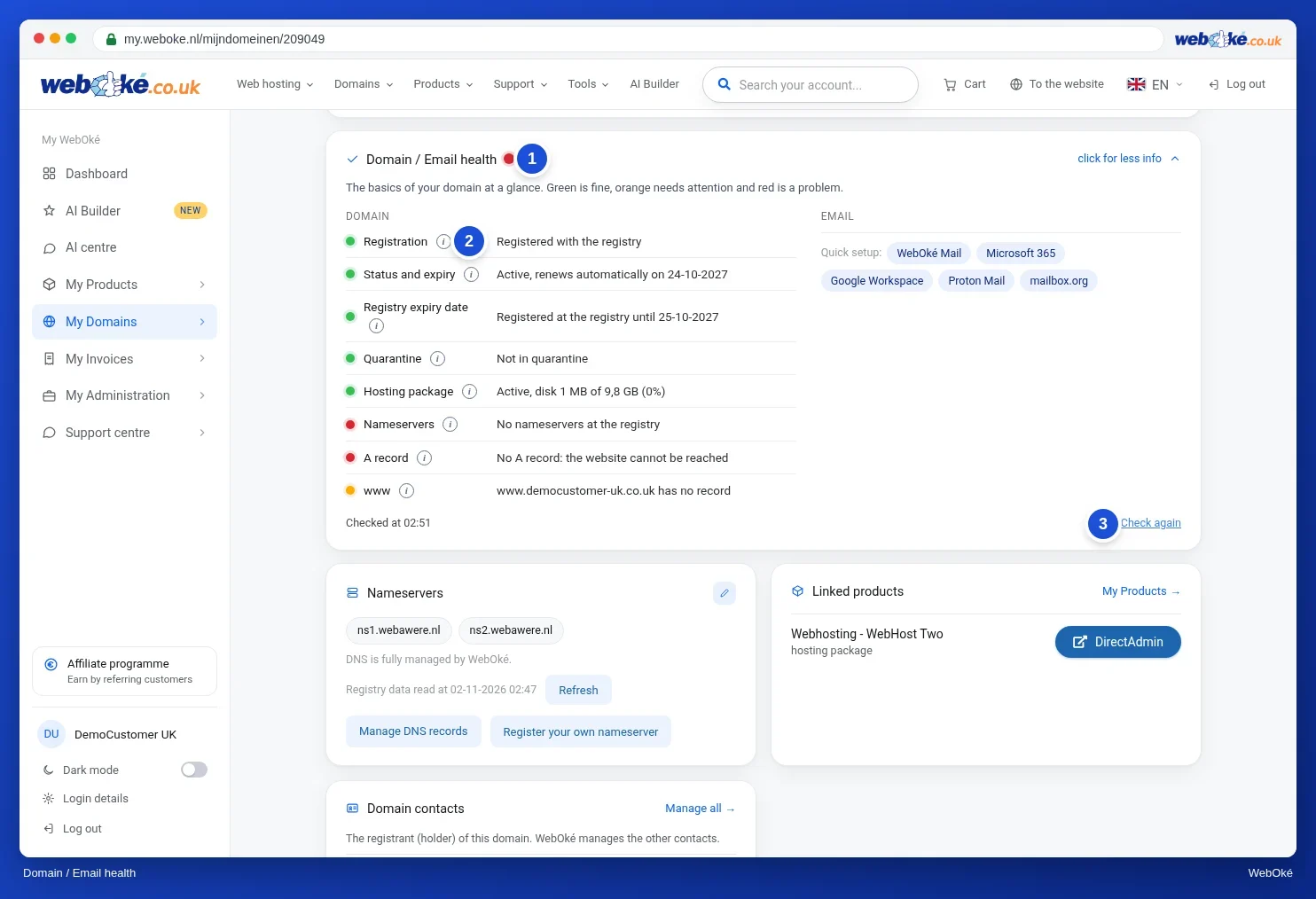
- Click on your domain. At the top you'll see the Domain / Email health card.
- Check the dots: green means all is well, orange needs attention and red is a problem. Click the i after a line for an explanation.
- Is there a button after a line, such as Update ns1/ns2 or Update key at registry? Click it to fix the issue right away.
- If you've made a change, click Check again.
Isn't your domain hosted with WebOké, or aren't you logged in? Then use the free Domain health tool on our website. All checks and fix buttons are listed in Domain and email health: checking and fixing.
Step 2: what the result means
- Registration: the transfer isn't finished yet. Check My Domains › Transfer centre, see How do I transfer my domain to WebOké?.
- Nameservers: if external nameservers are listed, your DNS is managed elsewhere, for example by your old provider or Cloudflare. Changes made with us then have no effect. Update the records there, or point the nameservers to ns1.webawere.nl and ns2.webawere.nl.
- A record: the domain still points to another server. Update the A record, see Adding or changing an A or AAAA record.
- www: there's no record for www. Add one.
- Website: the domain works, but the website itself shows an error. Read 500 Internal Server Error.
- SSL certificate: request a certificate as soon as the domain points to your package, see Activating an SSL certificate.
- DNSSEC: the key at the registry doesn't match. This often happens after a transfer. Use the Update key at registry button.
- MX (in the email column): shows where your mail is delivered. If there's a red dot here, your mail isn't reaching us.
A detailed table for each result is available in My domain still isn't working after a transfer or change.
Step 3: everything's green, but you still see the old site?
Then your computer or internet connection has still cached the old response.
- Reload the page with Ctrl+Shift+R (Mac: Cmd+Shift+R) or open your site in a private window.
- Try it on your phone using 4G or 5G, with wifi turned off.
- Restart your computer or router.
- Is your domain listed in your computer's hosts file, for example because you tested it earlier? Then remove that line. See How can I test my domain before it's transferred?.
You can read how long you need to wait after a change in How long does a nameserver or DNS change take?. A changed record usually works within an hour, new nameservers sometimes take up to 24 hours.
Do you see a WebOké page instead of your website?
Then the domain does point to us, but it hasn't been added to your hosting package yet, or your website isn't in the right folder yet. In DirectAdmin, check Domains to see if the domain is listed, and delete the default index.html page from public_html. See also My website doesn't work after uploading.
Email during the transfer
During a transfer, some of your mail may still arrive at your old provider. Set up your mail program for your mailbox at WebOké using your package's server name (such as linuxXX.webawere.nl) instead of mail.yourdomain.nl. That way you'll collect mail from both us and your old provider, so you won't miss anything. See Receiving email during a domain name transfer.
Does Domain health say everything is fine, but the problem persists? Then create a ticket in the Support centre of My WebOké and mention your domain and what you're seeing.
You might also enjoy reading: The history of the Domain name